Trends in Camera-Friendly LED Stage Lighting for Live Production
When a broadcast camera exposes banding across an LED wall, a performer’s skin tone shifts between fixtures, or a live stream reveals pulsing light that the audience cannot see, the problem is rarely solved by simply adding more output. Modern LED Stage Light systems must be selected for the camera, frame rate, shutter angle, and control network as carefully as for the venue. This guide examines camera-friendly LED stage lighting, flicker-free LED stage lights for live production, and LED stage lighting with high CRI, while explaining PWM, rolling shutter, genlock, DMX/RDM, color temperature, and pixel mapping in practical terms.
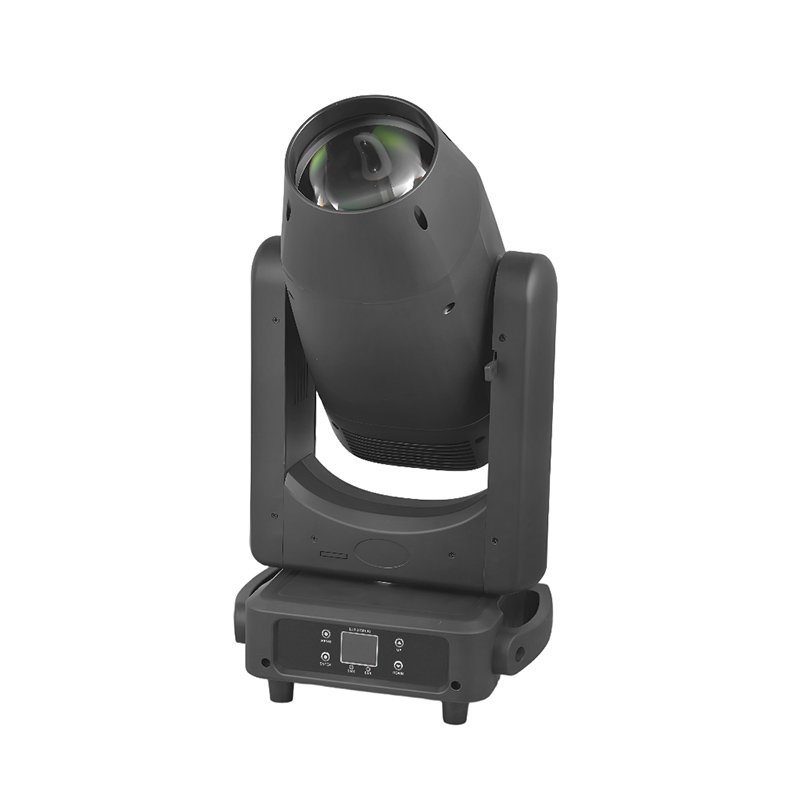
LED Stage Light Market Situation: Why Camera Compatibility Now Matters
Live production has moved beyond the traditional stage camera. The same event may be recorded by cinema cameras, studio cameras, robotic PTZ cameras, smartphones, action cameras, and LED-wall processors. Each device can react differently to pulse-width modulation, dimming curves, color spectrum, and shutter timing.
A fixture that looks stable to the human eye can still produce horizontal bars, dark bands, or intermittent brightness in recorded footage. These defects become especially visible when a production uses high shutter speeds, slow-motion capture, virtual production screens, or multiple camera systems with different frame rates.
The commercial pressure is also measurable. A lighting error can require a retake, create unusable content, delay a broadcast, or force an editor to mask affected shots. For a touring production, replacing unsuitable fixtures may involve freight, rigging labor, programming time, and additional testing. Buyers therefore increasingly evaluate an LED stage light by its behavior on camera rather than by wattage alone.
Camera-friendly lighting does not mean that every fixture uses identical settings. It means the fixture provides a controllable and documented operating range in which brightness and color remain stable under the intended camera settings. A reliable system combines suitable LED drivers, high-frequency dimming, consistent optics, calibrated color output, and a test procedure performed with the actual cameras.
Key Drivers Behind Camera-Friendly LED Stage Light Innovation
LED Stage Light Drivers Must Address PWM and Rolling Shutter
Many LED fixtures regulate output by rapidly switching the LEDs on and off. This technique is commonly called pulse-width modulation, or PWM. At lower dimming levels, the relationship between pulse frequency, pulse width, camera exposure time, and sensor readout can create visible modulation.
A rolling-shutter camera does not capture every row of the sensor at exactly the same moment. If the light output changes during the sensor scan, different rows can record different brightness levels. The result may appear as bands or traveling waves. Global-shutter cameras reduce this particular risk, but they do not remove every issue related to spectrum, synchronization, or exposure.
For this reason, “flicker-free” should not be treated as a universal guarantee. Buyers should ask for the manufacturer’s test conditions, including dimming percentage, frame rate, shutter angle, shutter speed, and measurement method. A fixture can perform well at 25 fps and 180 degrees yet show artifacts at 120 fps and a short shutter angle.
LED Stage Light Color Quality Is Now a Production Requirement
Camera sensors respond to the spectral distribution of light, not only to the number printed on a color-temperature display. Two fixtures both set to 3,200 K may produce different skin tones, green-magenta balance, and color separation.
CRI remains a familiar reference, but it should not be the only specification. TLCI is designed around television camera response, while TM-30 provides additional information about fidelity and gamut through metrics such as Rf and Rg. These metrics describe different aspects of color performance and should be interpreted with the intended camera and subject matter.
For interviews, concerts, and corporate broadcasts, buyers should compare skin-tone reproduction, white clothing, saturated stage colors, and LED-wall content under the same exposure. A fixture with a high headline CRI number can still require green correction or produce inconsistent results if its individual LED channels are poorly calibrated.
LED Stage Light Control Systems Must Support Complex Production Workflows
Large productions increasingly require DMX512-A, RDM, Art-Net, sACN, pixel mapping, wireless control, and fixture-status monitoring. These are not interchangeable features. DMX is commonly used for channel control, RDM can support two-way configuration and monitoring, while Art-Net and sACN transport lighting data over Ethernet networks.
Color control is also becoming more precise. RGBW fixtures can provide a cleaner white channel than RGB-only designs, while RGBA, RGBAL, and full-spectrum engines can expand color selection. More LED channels can improve control, but they also increase the number of parameters that programmers must manage. A useful fixture should offer simple white-light operation as well as advanced color control.
Emerging Camera-Friendly LED Stage Light Trends
1. High-Frequency LED Stage Light Dimming for High-Speed Cameras
The first major trend is the use of higher-frequency LED drivers and improved dimming algorithms. The goal is to reduce visible modulation when cameras operate at high frame rates or short exposure times.
However, frequency alone is not a sufficient buying criterion. For example, a 20 kHz PWM frequency may be outside the most visible range to the human eye, but the camera can still record artifacts depending on the duty cycle and scan timing. A manufacturer should explain whether the fixture uses PWM, constant-current regulation, hybrid dimming, or a selectable operating mode.
During a technical test, record the fixture at the exact settings planned for production:
23.976, 24, 25, 29.97, 30, 50, 59.94, and 60 fps where relevant;
180-degree and narrower shutter angles;
high-speed modes such as 100, 120, or 240 fps if slow motion is planned;
100%, 50%, 25%, 10%, and 1% intensity;
the full range of color temperatures and saturated colors.
Review the footage frame by frame. A waveform monitor or flicker meter can help identify modulation that is difficult to see on a small camera display. The test result, rather than a label on a product page, should determine whether the fixture is suitable.
2. LED Stage Light Integration with Genlock and Virtual Production
Virtual production and LED-volume work are increasing the need for timing coordination. An LED wall, camera, media server, and lighting system may need to operate at compatible refresh, scan, and synchronization settings. Genlock aligns video devices to a shared timing reference; it does not automatically make a conventional lamp flicker-free.
In a virtual production environment, the lighting fixture must also work with the camera exposure and the LED wall’s scan behavior. A fixture can be visually stable while the wall shows scan lines, or the wall can appear stable while the foreground lighting creates modulation. Testing must therefore include the complete camera view, not just an isolated lamp.
Some advanced fixtures and control systems provide timing, phase, or refresh-related settings. These functions are valuable only when the production team understands the signal path. The lighting console, network nodes, media server, LED processor, and cameras should be documented in one system diagram before rehearsals begin.
3. Tunable-White LED Stage Light Systems with Better Skin-Tone Control
Tunable-white fixtures allow operators to adjust correlated color temperature, often across a range such as approximately 2,700 K to 6,500 K, depending on the product. This helps a production match daylight, practical lamps, LED screens, and architectural sources without changing fixtures.
The important question is not simply how wide the range is. At the warm and cool ends, some fixtures lose output or develop a green-magenta shift. A buyer should request photometric data at several color temperatures, not only at the midpoint. Output at 3,200 K, 4,300 K, 5,600 K, and the intended extremes is more useful than a single maximum-lumen figure.
For broadcast work, a useful tunable-white LED stage light should provide repeatable presets, smooth transitions, calibrated channels, and independent green-magenta correction when available. These features reduce the time needed to match cameras and neighboring fixtures.
4. LED Stage Light Pixel Mapping and Effects Without Uncontrolled Flicker
Pixel-mapped effects are now common in concerts, product launches, esports, and music videos. Designers can control individual emitters or fixture zones to create chases, gradients, and low-resolution video effects.
The creative benefit comes with technical risks. Fast effects, low duty cycles, and rapid color changes can produce stroboscopic effects or interact badly with camera shutters. A pattern that appears smooth to the audience may become a sequence of frozen frames or uneven flashes in recorded footage.
Production teams should define a safe effects library. Each effect should be tested at the camera frame rates being used, and the operator should know how to disable or limit strobe behavior. In addition to visual comfort, productions may need to consider venue rules, broadcaster requirements, and photosensitive-audience guidance.
5. LED Stage Light Efficiency, Thermal Management, and Quieter Operation
LED fixtures generally convert more electrical energy into usable light than many legacy sources, but efficiency varies by design, color mode, optics, and operating temperature. A fixture’s published wattage does not directly indicate its output on a subject.
Thermal management affects color consistency and lifespan. Poor heat control can cause output reduction, color drift, or fan noise. In a studio, theater, house of worship, or conference room, acoustic performance may be as important as brightness. Buyers should request noise data in dBA, preferably with the measurement distance and operating mode stated.
For touring applications, lower power consumption can reduce circuit loading. The calculation should include the fixture’s maximum input power, inrush behavior, power-factor requirements, cable length, and the number of units on each circuit. A qualified electrician should verify the final distribution plan.
What Camera-Friendly LED Stage Light Trends Mean for Buyers
LED Stage Light Buyers Must Purchase a Tested System, Not a Fixture in Isolation
The correct fixture depends on the production chain. A camera-friendly result may still fail if the lens, shutter, ISO, LED wall, haze, reflective set, or neighboring lamp introduces a different problem. Buyers should involve the director of photography, lighting designer, technical director, camera operator, and venue electrician before final selection.
For a small studio, the priority may be quiet operation, consistent skin tones, and simple DMX control. For a touring concert, weight, rigging points, power distribution, weather protection, and rental-house compatibility may matter more. For a broadcast studio, long-term color stability, RDM monitoring, service access, and repeatable presets can outweigh peak output.
LED Stage Light Specifications That Deserve Verification
| Specification | What to ask | Why it matters on camera |
|---|---|---|
| Dimming method | Does the fixture use PWM, constant current, hybrid control, or selectable modes? | Helps identify possible modulation at low intensity and high shutter speeds. |
| Flicker performance | At what frame rates, shutter angles, intensity levels, and colors was it tested? | “Flicker-free” without test conditions is incomplete information. |
| Color metrics | Are CRI, TLCI, TM-30, Rf, Rg, and spectral data available? | Supports more reliable skin-tone and camera matching. |
| Output data | Are lux, beam angle, distance, color temperature, and photometric files supplied? | Allows lighting calculations instead of relying on maximum-lumen claims. |
| Control | Does it support DMX512-A, RDM, Art-Net, sACN, wireless control, and status feedback? | Determines how easily the fixture fits the existing control network. |
| Acoustics | What is the fan noise in dBA, and does silent mode reduce output? | Prevents cooling fans from entering dialogue or quiet musical passages. |
| Serviceability | Are LED engines, drivers, fans, and power supplies replaceable? | Reduces downtime and total ownership cost for frequent production use. |
How to Test an LED Stage Light Before a Live Production
Step 1: Define the Camera and LED Stage Light Operating Conditions
Write down every camera format that will be used. Include resolution, frame rate, shutter angle or shutter speed, ISO, picture profile, exposure method, and whether slow motion is required. Also document the LED wall refresh rate, scan mode, processor, and media-server settings when applicable.
Step 2: Build a Representative Lighting Scene
Use a person with different skin tones, white fabric, saturated colored objects, reflective surfaces, and the actual stage set. Test the fixture beside the other lights that will remain in the final design. A single lamp pointed at a white wall cannot reveal all color-matching problems.
Step 3: Test the LED Stage Light Across Its Dimming Range
Record at full output, 75%, 50%, 25%, 10%, and the lowest level required in the show. Repeat the test at warm white, neutral white, cool white, and the principal colors used by the designer. Inspect for bands, pulsing, hue changes, noise, and uneven output.
Step 4: Confirm Control and Recovery Behavior
Disconnect and reconnect the DMX or network signal, trigger a blackout, change presets, and test power cycling. Confirm that the fixture returns to the intended state and does not flash at an unsafe or distracting level. Check RDM discovery and addressing before the rig is flown or enclosed.
Step 5: Save Evidence for Procurement and Rehearsal
Keep camera files, measurement reports, fixture firmware versions, console show files, and approved settings. If Zeyi Technology or another supplier provides a camera test, request the exact fixture model, firmware version, test camera, frame rate, shutter setting, dimming level, and measurement method. This documentation makes it easier to reproduce the result when a rental batch or firmware revision changes.


Comments
Post a Comment